
Video showing newer features:
2.9:
You MUST hold shift while pressing a pad to enter pad input mode.
2.8:
Added more quantise division options
2.5:
Added Triplets to quantised options
Velocity Randomisation…
When velocity falloff is set, the hits on a slot are reduced sequentially and equally based on the spread of notes (i.e. if you set falloff to 100% on a pad with 4 notes they should play 100%, 75%, 50%, 25% of input velocity).
In INPUT mode theres a new ‘random’ knob that can set a randomness spread %. At 100% each note played will be louder or quieter than its ‘straight’ velocity, i.e. 75 will play somewhere between 50 and 100, 50 will play between 75 and 25. So setting this knob to 50% should ensure note velocity is randomised but they are still sequentially reducing in volume.
2.0:
~ Delay can now be set to quantized divisions, hit shift and change the delay from free to quantize. If you changed host tempo after running the script, start host playback to recalculate quantize.
1.5:
~ Control area settings are under only accessible in INPUT mode
~ in PLAY mode, the top knobs can select a root and scale to quantize (dont change while notes are playing or stuck notes are likely)
1.0:
~ Delays store per pad
~ Velocity reduction (based on number of steps on a pad, ensuring last note isn’t 0 when set to 100%, stored per pad)
0.5: delay bugfix
0.4: Added delay to note offs to avoid sticking
0.3: Added note playback delay
0.2: Updated to show intervals on pads, and hopefully remove sticky notes.
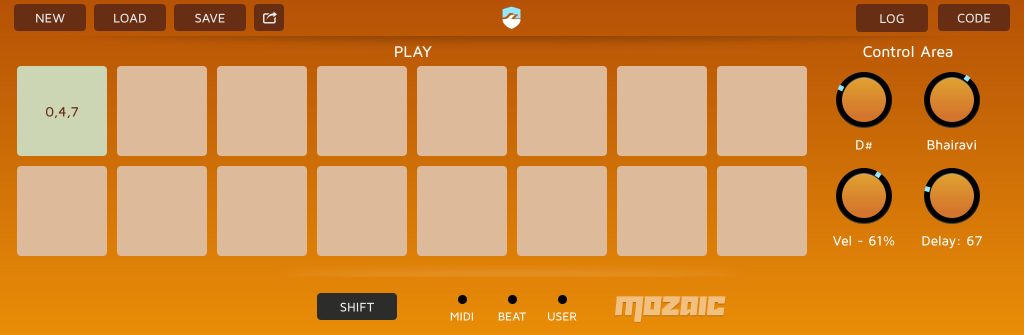
Press ‘shift’ once to enter edit mode, now press any note and hold it, this sets the root note/anchor. add any notes to the chord, above or below the root – they are stored as intervals. Hit shift again to exit edit mode. THE ORDER YOU PLACE NOTES MATTERS. To replace a chord, just let go of all notes and try again.
You can store up to 16 intervals and control them via keyboard input, notes assigned by using the knobs (or midi map the Mozaic pads directly)

Smart idea to create and play chords.
This mozaic script: https://patchstorage.com/midi-cc-automatable-transposer-scaler-v1-0/
contains code for your hanging notes.
Thanks! I didn’t see the comment, but I just updated and hopefully fixed the stuck notes, plus added interval numbers on the pads so you know what you stored :)
😀
Very useful new features. Using the above mentioned code gives no stuck notes while changing key and scale.
Hey acoustiman, I’ve added a bunch more features.
When you say ‘using the above mentioned code’ do you mean running it through Ki’s script? Please let me know! 🙏
No, this is the code Ki developed to prevent stucked notes:
@OnMidiInput
chan = MIDIChannel
if MIDICommand = 0x90 //note-ons
noteIn = MIDINote
noteOut = ScaleQuantize (noteIn + transpose)
if noteOut >= 0 and noteOut <= 127
stateIn = GetNoteState chan, noteIn
stateOut = GetNoteState chan, noteOut
noteSendIn = stateIn % shift
noteOrigIn = RoundDown stateIn / shift
noteSendOut = stateOut % shift
noteOrigOut = RoundDown stateOut / shift
if noteSendIn = empty
if noteOrigOut = empty
SendMIDINoteOn chan, noteOut, MIDIVelocity
if noteIn = noteOut
noteOrigIn = noteIn
else
SetNoteState chan, noteOut, noteIn*shift + noteSendOut
endif
endif
SetNoteState chan, noteIn, noteOrigIn*shift + noteOut
endif
endif
elseif MIDICommand = 0x80 // note-offs
noteIn = MIDINote
stateIn = GetNoteState chan, noteIn
noteSendIn = stateIn % shift
noteOrigIn = RoundDown stateIn / shift
noteOut = noteSendIn
stateOut = GetNoteState chan, noteOut
noteSendOut = stateOut % shift
noteOrigOut = RoundDown stateOut / shift
if noteSendIn empty
if noteOrigOut = noteIn
SendMIDINoteOff chan, noteOut
if noteIn = noteOut
noteOrigIn = empty
else
SetNoteState chan, noteOut, empty*shift + noteSendOut
endif
endif
SetNoteState chan, noteIn, noteOrigIn*shift + empty
endif
else
SendMIDIThru
endif
@End
For some reason I NEVER get message notifications from Patchstorage :(
Anyhoo, I’ve added more quantise division options as requested on YouTube :)
Thx for adding!