
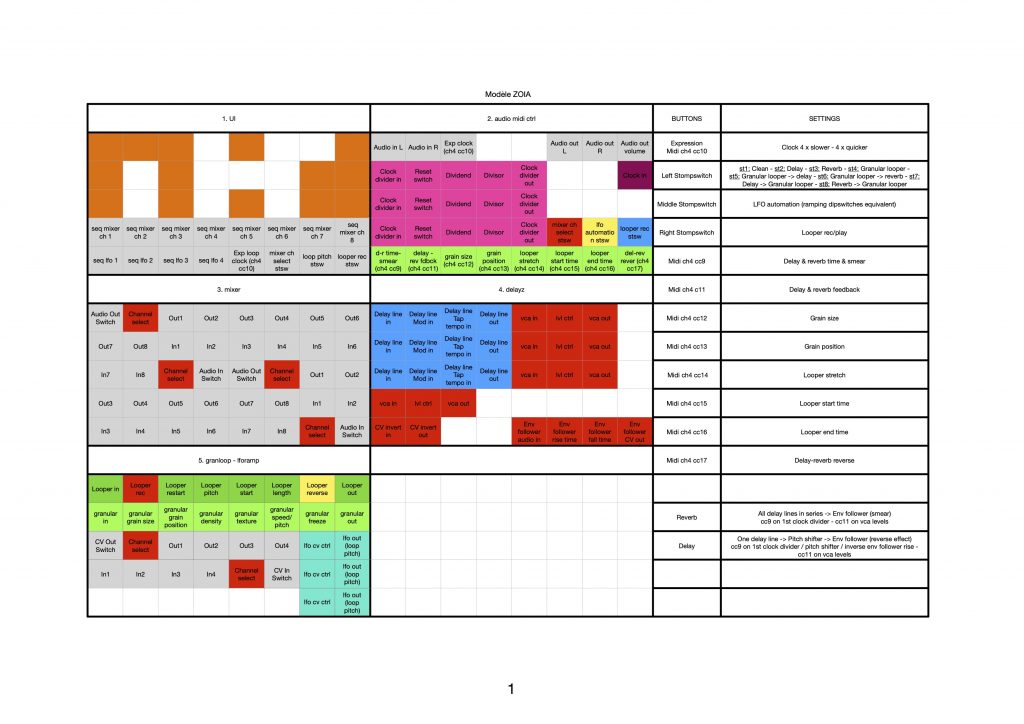
Inspired by Chase Bliss Mood
Trying to reproduce some functions based on YouTube reviews (never owned a Mood)…
Left stompswitch:
1) clean
2) delay
3) reverb
4) looper & granular
5) looper & granular -> delay
6) looper & granular -> reverb
7) delay -> looper & granular
8) reverb -> looper & granular
Middle stompswitch:
1) no ramping
2) delay-reverb time ramping
3) delay-reverb feedback ramping
4) looper detune ramping
Right stompswitch:
Record – Play
Assigned midi controls (with external controller):
cc 9 – delay-reverb time
cc11 – delay-reverb feedback
cc12 – grain size
cc13 – grain position
cc14 – looper pitch
cc15 – loop starting point
cc16 – loop ending point
cc17 – loop reverse & delay-reverb attacks attenuation

Hi, love this patch and the others, cosmo, bitz, microz, great contributions. Many thanks also for the page layouts (I soooo wish everyone did this). Is there any way of getting higher res versions of these, the jpgs are readable but fuzzy (I have rubbish eyes). Thanks again A+++
Hi,
Thanks, I’m glad it’s useful! 👍 😊
Is it better here as an attached file?
Attachment MOODZ.zip
I’m eager to try this one out! And the Cozmo too. I like the little midi controller in your video. What make is it?
Thanks for the high res page layout – perfect.
Hi @thekitzmann !
I hope you’ll like the patches!
The midi controller is a Faderfox EC4. Really nice!
“inspired by” is far too modest. This is what the Mood SHOULD have been. Lots of fun, very creative, intuitive, and very musical. Gold Star! And thank you much!
Come to think of it, this is an interesting exercise in what’s expected vs what’s delivered. To base the patch on the idea the pedal was sold on and the more interesting sounds people produced with it in review videos renders something in the same ballpark sound wise but far more musical and with a broader set of uses- if nothing else, it says a lot about the control structure you imposed on the idea, shaped by the features/limits zoia imposes on user input.
Hey Tim Rizzo! Thank you for your message, glad you enjoy this patch! 😊
This exercise is indeed quite interesting: beside the frame of the technical aspects, the structure of the patch is mainly based on my auditive perception of the pedal and the features/sounds I wanted to render…
Other exercises expected when the time comes…
Hi, I’m trying to figure out how to use this with a Euroburo. I see on the button layout that there are three buttons on the first page that seem to correspond to the three stompswitches, but on my patch two of them (the last two) are empty. Needless to say, I can’t figure out how to record.
Hi!
The blue arrows are the connections of each stompswitch.
For the middle one, you have to erase a pixel that’s on the gate input of the sequencer (red on the PDF) and connect your pushbutton.
Please tell me if it doesn’t work!
Attachment MOODZ-2-65aa313613923.zip
Thanks, but I’m still confused. I can’t tell that anything happens when I press those three buttons on the second page, and when I press the record button on the last page, a loop clearly gets recorded (it has a length), but I never hear anything. I tried tapping the two rows of buttons on the first page to move through the sequencer/options, and still nothing changed. So I can’t even get the delay to work like in the beginning of the youtube clip :/
Hi moacir,
Here is a euroburo version of the patch:
– You can use the first button down left (off grid) to cycle between delay, reverb, loops, etc.
– You can use the second button down left (off grid) to cycle between the “automations”
– The record button is on the first page (red down right)
There’s a pitch shifter (down left) on the same page as the looper and it was set to -24 semi tones, maybe that’s why you couldn’t hear anything. I set it to 0 in this version of the patch.
I hope you can now use it! :-)
Attachment 012_zebu_moodz-65be73c76ab86.bin.zip
Is there a way to get external tap tempo working on the delays here? Amazing patch new to editing patches and trying to figure out how to make this work with 🤯
I figured it out after a long manual dive! Very sweet patch
Hi michael! Happy to know that you figured it out. And that you like the patch!