
A collection of 25+ MIDI data filters
All Modeled by x42
Credit: Robin Gareus
MIDI CC to Note
MIDI CC to Note enables you to convert MIDI control change messages to note-on/off messages. Note off is queued 10 msec later.
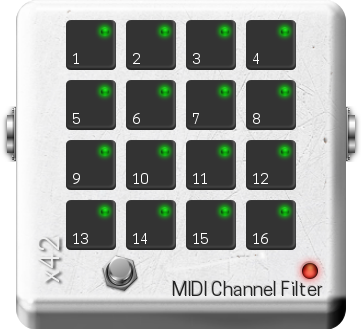
MIDI Channel Filter
MIDI channel filter. Only data for selected channel shall pass. This filter only affects midi-data which is channel relevant (ie note-on/off, control and program changes, key and channel pressure and pitch bend). MIDI-SYSEX and Realtime message are always passed on.
MIDI Channel Map
MIDI Channel Map enables you to rewrite midi-channel numbers. This filter only affects midi-data which is channel relevant (ie note-on/off, control and program changes, key and channel pressure and pitch bend). MIDI-SYSEX and Realtime message are always passed thru unmodified.
MIDI Chord
This harmonizer creates chords from a single (fundamental) note in a given musical scale. The scale as well as intervals can be automated freely (currently held chords will change). Note-ons are latched, for multiple/combined chords only single note-on/off will be triggered for the duration of the combined chords. If a off-scale note is given, it will be passed through – no chord is allocated.
MIDI Enforce Scale
MIDI Enforce Scale enables you to filter note-on/off events depending on musical scale. If the key is changed note-off events of are sent for all active off-key notes.
MIDI Event Filter
MIDI Event Filter is a notch style message filter. It enables you to suppress specific messages. For flexible note-on/off range see also ‘keyrange’ and ‘velocityrange’.
MIDI Key-Range Filter
MIDI Key Range Filter lets you define a range of allowed midi notes. Notes-on/off events outside the allowed range are discarded. If the range changes, note-off events are sent to currently active notes that end up outside the valid range.
MIDI Keysplit
MIDI Keysplit enables you to change midi-channel number depending on note. The plugin keeps track of transposed midi-notes and sends note-off events accordingly if the range is changed even if a note is active.
MIDI CC Map
MIDI CC Map enables you to change one control message into another. Combined with MIDI Scale CC Value, it allows you to modify/scale the actual value.
MIDI Note/Channel Map
A 12-tone channel map which allows you to change midi-channel per note.
MIDI Note Transpose
MIDI Note Transpose is a flexible 12-tone map which allows you to map a note within an octave to another note in the same octave-range +- 12 semitones. Alternatively, notes can also be disabled. The settings can be changed dynamically: Note-on/off events will be sent accordingly.
MIDI Delayline
MIDI Delayline enables you to delay all MIDI events by a given time which is shown as BPM and beats. If the delay includes a random factor, this effect takes care of always keeping note on/off events sequential regardless of the randomization.
MIDI Channel Unisono
MIDI Channel Filter Unisono enables you to duplicate MIDI events from one channel to another.
MIDI Strum
A midi arpeggio effect intended to simulate strumming a stringed instrument (e.g. guitar). A chord is ‘collected’ and the single notes of the chord are played back, spread out over time. The ‘Note Collect Timeout’ allows for the effect to be played live with midi-keyboard.
MIDI Chromatic Transpose
A chromatic transpose of midi notes and key-pressure. If an inversion point is set, the scale is mirrored around this point before transposing. Notes that end up outside the valid range 0..127 are discarded.
MIDI Monophonic Legato
MIDI Monophonic Legato allows you to hold a note until the next one arrives. In order to switch it off, replay the same note again.
MIDI Duplicate Blocker
MIDI Duplicate Blocker enables you to filter out overlapping notes on/off and duplicate messages.
MIDI Remove Active Sensing
A filter made to block all active sensing events. Active sensing messages are optional MIDI messages intended to be sent repeatedly to tell a receiver that a connection is alive, however they can clutter up the MIDI channel or be inadvertently recorded when dumping raw MIDI data to disk.
MIDI Note to CC
MIDI Note to CC allows you to convert only MIDI note-on messages to control change messages (ignored in toggle mode).
MIDI Note Toggle
With MIDI Note Toggle, play a note to turn it on and play it again to turn it off.
MIDI N-Tap Delay
MIDI N-Tap Delay repeats notes N times, where N is either a fixed number or unlimited as long as a given key is pressed. BPM and delay-time variable allows tempo-ramps. On every repeat the given velocity-adjustment is added or subtracted, the result is clamped between 1 and 127.
MIDI Quantization
Live event quantization. This filter aligns incoming MIDI events to a fixed time-grid. Since the effect operates on a live-stream, it will introduce latency: events will be delayed until the next ‘tick’.
MIDI Velocity Randomization
MIDI Velocity Randomization lets you randomize the velocity of MIDI notes (both note on and note off).
MIDI Scale CC Value
MIDI Scale CC Value enables you to modify the value (data-byte) of a MIDI control change message.
MIDI Simple Channel Filter
Simple MIDI channel filter. Only data for selected channels may pass. This filter only affects midi-data which is channel relevant (ie note-on/off, control and program changes, key and channel pressure and pitchbend). MIDI-SYSEX and Realtime message are always passed on. See also ‘MIDI Channel Map’ filter.
MIDI Sostenuto
MIDI Sostenuto delays note-off messages by a given time, emulating a piano sostenuto pedal. When the pedal is released, note-off messages that are queued will be sent immediately.
MIDI Velocity-Range Filter
MIDI Velocity-Range Filter will filter MIDI note-on events according to velocity. Note-on events outside the allowed range are discarded. If a Note-off is received for a note that was previously filtered, it is also not passed though.
MIDI Velocity Adjust
With MIDI Velocity Adjust, change the velocity of note events with separate controls for Note-on and Note-off. The input range 1 – 127 is mapped to the range between Min and Max. If Min is greater than Max, the range is reversed. The offsets value is added to the velocity event after mapping the Min/Max range.
