
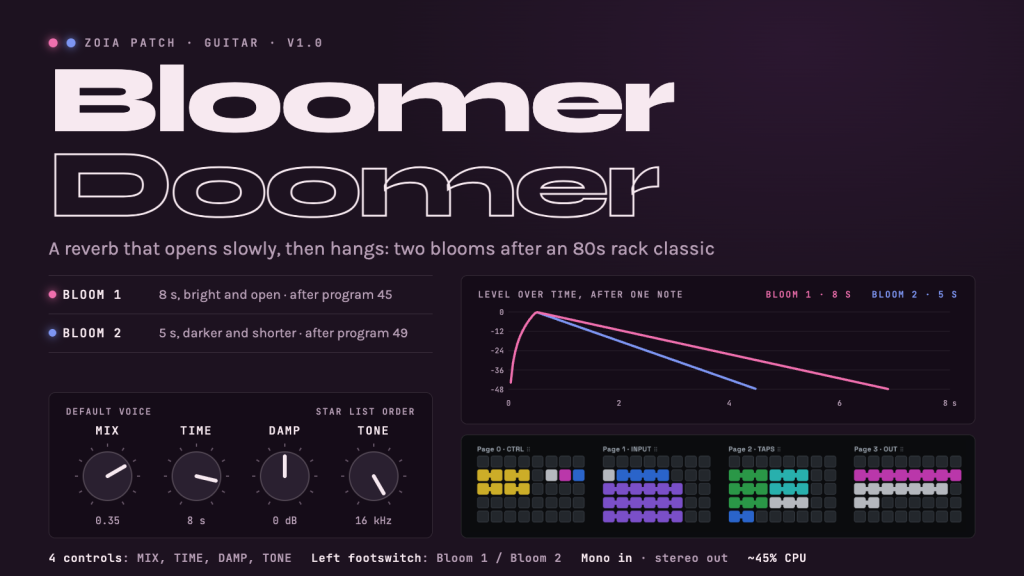
Bloomer Doomer: a slow-opening bloom reverb for guitar
A guitar patch built around the “Bloom” programs of the Alesis Midiverb II, the 1987 rack reverb: program 45 (Bloom 1, 8 seconds) and program 49 (Bloom 2, 7 seconds). They sit in the unit’s reverse bank, and they behave differently from a normal reverb: the sound does not start at full level and fade. It swells up over about half a second, opens into a wide, very diffuse wash, and then hangs for a long time.
What it does: you play a note and the reverb rises behind it instead of answering it. Chords smear into a cloud; single notes get a halo that arrives late.
The four controls follow the Bloom mode of the staticdweller Reverie pedal, which revisits the same programs: reverb time, damping, a low-pass filter and mix. The left footswitch flips between two blooms, a long bright one and a shorter, darker one.
This is an independent patch made with stock ZOIA modules. The Midiverb II’s algorithms are not public, so it recreates the documented behaviour (rise, length, density) and is voiced by ear against recordings of the real unit. It is not a clone, and it is not affiliated with or endorsed by Alesis or staticdweller.
QUICK START
1. Copy 002_zoia_Bloomer_Doomer.bin to your SD card (change the 002 prefix to the slot you want), then Config > Patches from SD.
2. Guitar into input L. Use both outputs for stereo.
3. Play and let notes ring. The default is Bloom 1: 8 seconds, bright, about 70% effect.
4. Press the left footswitch for Bloom 2. The light on page 0 goes from magenta (Bloom 1) to blue (Bloom 2).
5. Press Star with nothing selected to reach the four controls from anywhere.
CONTROLS (star list, in this order)
MIX|number
Dry/effect crossfade, scaled so the encoder covers it quickly.
0 = dry only · 0.25 = equal parts · 0.5 = effect only. Above 0.5 nothing changes.
Default 0.35 (about 70% effect).
TIME|number
Length of the reverb tail, from about 2 s (0) to about 13 s (1).
Default 0.844 = 8 s, the length of the original Bloom 1.
DAMP|number
Highs in the tail: 0 = -8 dB (dark) · 0.5 = flat · 1 = +8 dB (bright). dB = 16 x value – 8.
Default 0.5.
TONE|number
Low-pass filter on the signal going into the effect, 1 kHz (0) to 16 kHz (1). 0.5 is about 4 kHz, 0.75 about 8 kHz. The dry signal is not filtered.
Default 1.0 (16 kHz, fully open).
THE TWO BLOOMS (left footswitch)
Bloom 1 (magenta light): the knobs as you set them. At the defaults: 8 s, flat highs, filter open.
Bloom 2 (blue light): the same knobs, pulled down by a fixed amount. At the defaults: 5 s, highs cut by 4 dB, filter at 6 kHz. Shorter and darker, closer to the dry sound.
Bloom 2 always sits below Bloom 1, wherever the knobs are. If TIME, DAMP or TONE is already near 0, there is no room left to pull it down and the two blooms sound alike.
On the original unit the two programs are closer together (8 s and 7 s). Here the gap is made wider on purpose, so that the switch is worth pressing.
STARTING POINTS
MIX TIME DAMP TONE BLOOM
Bloom 1 (default) 0.35 0.844 0.5 1.0 1
Bloom 2 0.35 0.844 0.5 1.0 2
Halo behind chords 0.2 0.844 0.5 1.0 1
All wash 0.5 1.0 0.5 1.0 1
Dark cloud 0.35 0.844 0.25 0.65 1
Short swell 0.3 0 0.5 1.0 1
These are places to start, not presets: adjust by ear.
TIPS
– Let it breathe. The bloom needs about half a second to open, so sparse playing shows it best; fast strumming turns into a steady wash.
– Fuzz or distortion before the patch gives the big, smeared wall. After the patch, it gets rougher and louder as the tail builds.
– With MIX at 0.5 you hear only the bloom: every attack is softened, like a slow volume swell.
– If the tail is too bright with dirt, lower DAMP first, then TONE.
– For mono rigs, use output L.
– Press Save after tweaking to keep your settings as the patch defaults.
UNDER THE HOOD
IN > low-pass (TONE) > 3 diffusers in series > 5 delay taps (89 to 449 ms) with rising levels > Plate Reverb (TIME, DAMP) > stereo Audio Balance (MIX) > OUT L/R.
The diffusers smear each note into a dense cluster. The five taps repeat that cluster with each one louder than the last (-20, -15, -10, -5, 0 dB), which makes the slow rise. The plate reverb, fully wet, turns the rising cluster into the long tail. The left footswitch sends a fixed negative offset to the TIME, DAMP and TONE values for Bloom 2.
WHERE THE NUMBERS COME FROM
– Program names and lengths (45 = Bloom 1, 8 s; 49 = Bloom 2, 7 s) come from the Midiverb II program list.
– The control set and ranges (reverb time about 2 to 13 s, damping, low-pass 1 to 16 kHz, mix) follow the published control sheet of the Reverie’s Bloom mode.
– The rise time (about half a second), the tap levels and the tail brightness are estimates, set by ear against a recording of a real Midiverb II.
– Bloom 2 at 5 s and darker is a deliberate exaggeration of the original’s 7 s.
– The patch does not reproduce the unit’s converters or its actual reverb algorithm.
SPECS
4 pages · 22 modules · 32 connections
CPU about 45% (ZoE estimate)
Mono in (L), stereo out
Built and tested on firmware 5.00 or later
Left footswitch: Bloom 1 / Bloom 2
MORE PATCHES AND SUPPORT
My other ZOIA patches on PatchStorage:
– Reverse Reflect, 80s rack-style early reflections: https://patchstorage.com/reverse-reflect/
– Caveinator, the BOSS PS-3 mode 7 inverse pitch-shift delay: https://patchstorage.com/caveinator-ps-3-mode-7-emulation/
If you enjoy this patch and want to support the next ones, you can buy me a coffee: https://ko-fi.com/imkarst
CREDITS
Built and checked with ZoE, the visual patch editor by alh (rawmedium.org/ZoE).
Inspired by the Alesis Midiverb II, the staticdweller Reverie, and the guitar sound of Kevin Shields and My Bloody Valentine.
v1.0: first public release.
