
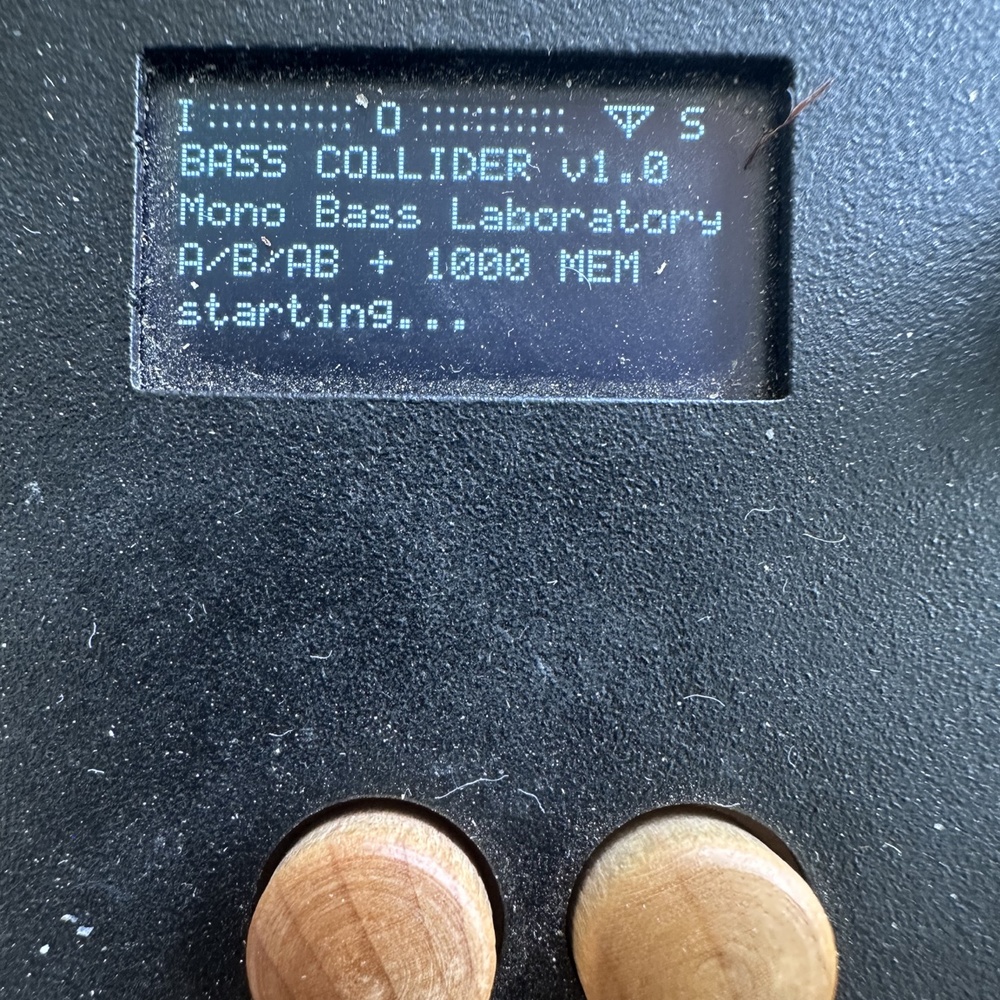
BASS COLLIDER is an original open-source monophonic bass synthesizer, 16-step sequencer and live performance instrument for the Critter & Guitari Organelle S2, created by Pascal Glenn.
It combines a driven resonant bass synth with saw/pulse morphing, sub oscillator, Accent and true Slide/Glide, plus a graphical 16-step A / B / A-B sequencer.
Each step can be shaped with note, velocity, probability, ratchet and parameter locks, while the synth includes cutoff, resonance, drive, envelopes, LFO modulation, delay, reverb and stereo effects.
The Organelle wooden keyboard can be played live across the performance pages and has its own LIVE OCTAVE range from -3 to +2, independent from the sequencer octave.
BASS COLLIDER includes 10 factory sound presets and 6 factory bass riffs as starting points. These presets and riffs are included for inspiration; any sounds, bass lines or complete setups you create can be stored in one of the 1000 USER memory slots.
All 1000 memories can be SAVED, LOADED and DELETED directly from the Organelle, allowing you to build a large personal library of bass sounds and sequences.
A SOUND HOME command instantly restores the original starting sound without deleting your current pattern, so you can experiment freely and always return to a clean reference point.
New sessions start with empty A and B patterns, while the included factory sounds and riffs remain available whenever you want a starting point.
Created by Pascal Glenn — 2026
Licensed under GPL-3.0-or-later.
Independent open-source project. Not affiliated with or endorsed by Critter & Guitari or any other hardware manufacturer.

when loading this patch i get a black screen… (on Organelle M)
i’ve installed Icarus and DX7 supercollider and they all give me the same result when opened.
Bass Collider was developed and tested on an Organelle S2 running Raspbian 12 “Bookworm.”
Since Icarus and DX7 SuperCollider also give you the same black screen on your Organelle M, this suggests that the problem may be related to the SuperCollider installation/launcher or compatibility on the Organelle M, rather than Bass Collider itself.
Could you please tell me exactly which Organelle OS/version you are running?
If you have access to the terminal, could you also run these two commands and send me the results?
which sclang
sclang -v
Please don’t reinstall or change anything yet. Once I know your OS version and what SuperCollider is doing on your machine, I can investigate whether Bass Collider needs an Organelle M compatibility fix.
Thanks again for testing it and letting me know!
I checked the Organelle M differences and prepared a compatibility test build for you.
The Organelle M can be running different OS generations, so this version is designed to handle both the older M/S SuperCollider environment and the newer OS.
This test changes the Bass Collider launch/compatibility layer only. It automatically detects the available SuperCollider server, can use scsynth when supernova is unavailable, handles the older Organelle paths, and forces SuperCollider to run headlessly to avoid the old black-screen/display problem.
Please install BASS_COLLIDER_M_COMPAT_TEST1.zip as a separate patch and try it without deleting your original Bass Collider.
If it works, please let me know your Organelle OS version so I can confirm the fix.
If it still gives you a black screen, please send me:
1. Your OS version from SYSTEM → Info
2. /sdcard/data/basscollider/basscollider-log.txt
That log should tell me exactly where it is failing.
Thanks for helping me test Organelle M compatibility!
Attachment BASS_COLLIDER_M_COMPAT_TEST1_ready-6abaa4e0679dc.zip
Hey thank you very much!
I do still get a black screen with the test…
I am running OS 5.1
========================================
BASS COLLIDER M COMPAT TEST1
Wed 18 Mar 03:42:42 GMT 2026
========================================
patchdir: /tmp/patch
uname: Linux organelle-s2 6.6.56-v7+ #1 SMP Thu Oct 10 15:10:41 EDT 2024 armv7l GNU/Linux
— /etc/os-release —
PRETTY_NAME=”Raspbian GNU/Linux 12 (bookworm)”
NAME=”Raspbian GNU/Linux”
VERSION_ID=”12″
VERSION=”12 (bookworm)”
VERSION_CODENAME=bookworm
ID=raspbian
ID_LIKE=debian
HOME_URL=”http://www.raspbian.org/”
SUPPORT_URL=”http://www.raspbian.org/RaspbianForums”
BUG_REPORT_URL=”http://www.raspbian.org/RaspbianBugs”
———————–
sclang: /usr/local/bin/sclang
/usr/local/bin/sclang: error while loading shared libraries: libncurses.so.5: cannot open shared object file: No such file or directory
audio server: supernova
starting JACK with: /home/music/fw_dir/scripts/start-jack.sh
jackdmp 1.9.12
Copyright 2001-2005 Paul Davis and others.
Copyright 2004-2016 Grame.
Copyright 2016-2017 Filipe Coelho.
jackdmp comes with ABSOLUTELY NO WARRANTY
This is free software, and you are welcome to redistribute it
under certain conditions; see the file COPYING for details
JACK server starting in realtime mode with priority 90
self-connect-mode is “Don’t restrict self connect requests”
audio_reservation_init
Acquire audio card Audio0
creating alsa driver … hw:0|hw:0|128|2|44100|2|2|nomon|swmeter|soft-mode|32bit
configuring for 44100Hz, period = 128 frames (2.9 ms), buffer = 2 periods
ALSA: final selected sample format for capture: 32bit integer little-endian
ALSA: use 2 periods for capture
ALSA: final selected sample format for playback: 32bit integer little-endian
ALSA: use 2 periods for playback
/usr/local/bin/sclang: error while loading shared libraries: libncurses.so.5: cannot open shared object file: No such file or directory
sclang exited: 127
Jack main caught signal 15
Released audio card Audio0
audio_reservation_finish
Thank you — your log identified the problem exactly.
JACK and Supernova are starting correctly, but the existing /usr/local/bin/sclang on your OS 5.1 installation cannot start because it is missing the legacy libncurses.so.5 library.
I have prepared a new test specifically for this exact error:
BASS_COLLIDER_OS51_FIX_TEST2.zip
Please connect the Organelle to the Internet, install this new test as a separate patch, and let the installer complete.
This version first tries to repair the existing SuperCollider installation by installing the missing Bookworm compatibility library. If that is not enough, it can install the Bookworm SuperCollider runtime instead.
After the installation reports that SuperCollider is ready:
1. Reboot the Organelle once.
2. Launch BASS_COLLIDER_OS51_FIX_TEST2.
3. Let me know whether Bass Collider opens and produces sound.
If it still fails, please send me:
/sdcard/data/basscollider/os51-install.log
and
/sdcard/data/basscollider/basscollider-log.txt
Thanks — your report was extremely helpful because we now know the exact OS 5.1 compatibility issue.
Attachment BASS_COLLIDER_OS51_FIX_TEST2-6abd29082309f.zip
========================================
BASS COLLIDER OS 5.1 FIX TEST2
Wed 18 Mar 03:46:49 GMT 2026
========================================
PRETTY_NAME=”Raspbian GNU/Linux 12 (bookworm)”
NAME=”Raspbian GNU/Linux”
VERSION_ID=”12″
VERSION=”12 (bookworm)”
VERSION_CODENAME=bookworm
ID=raspbian
ID_LIKE=debian
HOME_URL=”http://www.raspbian.org/”
SUPPORT_URL=”http://www.raspbian.org/RaspbianForums”
BUG_REPORT_URL=”http://www.raspbian.org/RaspbianBugs”
arch: armhf
kernel: Linux organelle-s2 6.6.56-v7+ #1 SMP Thu Oct 10 15:10:41 EDT 2024 armv7l GNU/Linux
— legacy sclang test —
/usr/local/bin/sclang: error while loading shared libraries: libncurses.so.5: cannot open shared object file: No such file or directory
Get:1 http://archive.raspberrypi.com/debian bookworm InRelease [54.9 kB]
Get:2 http://raspbian.raspberrypi.com/raspbian bookworm InRelease [15.0 kB]
Reading package lists…
W: http://raspbian.raspberrypi.com/raspbian/dists/bookworm/InRelease: Key is stored in legacy trusted.gpg keyring (/etc/apt/trusted.gpg), see the DEPRECATION section in apt-key(8) for details.
E: Release file for http://raspbian.raspberrypi.com/raspbian/dists/bookworm/InRelease is not valid yet (invalid for another 158d 6h 37min 56s). Updates for this repository will not be applied.
E: Release file for http://archive.raspberrypi.com/debian/dists/bookworm/InRelease is not valid yet (invalid for another 196d 13h 0min 39s). Updates for this repository will not be applied.
ERROR: apt update failed
========================================
BASS COLLIDER M COMPAT TEST1
Wed 18 Mar 03:42:42 GMT 2026
========================================
patchdir: /tmp/patch
uname: Linux organelle-s2 6.6.56-v7+ #1 SMP Thu Oct 10 15:10:41 EDT 2024 armv7l GNU/Linux
— /etc/os-release —
PRETTY_NAME=”Raspbian GNU/Linux 12 (bookworm)”
NAME=”Raspbian GNU/Linux”
VERSION_ID=”12″
VERSION=”12 (bookworm)”
VERSION_CODENAME=bookworm
ID=raspbian
ID_LIKE=debian
HOME_URL=”http://www.raspbian.org/”
SUPPORT_URL=”http://www.raspbian.org/RaspbianForums”
BUG_REPORT_URL=”http://www.raspbian.org/RaspbianBugs”
———————–
sclang: /usr/local/bin/sclang
/usr/local/bin/sclang: error while loading shared libraries: libncurses.so.5: cannot open shared object file: No such file or directory
audio server: supernova
starting JACK with: /home/music/fw_dir/scripts/start-jack.sh
jackdmp 1.9.12
Copyright 2001-2005 Paul Davis and others.
Copyright 2004-2016 Grame.
Copyright 2016-2017 Filipe Coelho.
jackdmp comes with ABSOLUTELY NO WARRANTY
This is free software, and you are welcome to redistribute it
under certain conditions; see the file COPYING for details
JACK server starting in realtime mode with priority 90
self-connect-mode is “Don’t restrict self connect requests”
audio_reservation_init
Acquire audio card Audio0
creating alsa driver … hw:0|hw:0|128|2|44100|2|2|nomon|swmeter|soft-mode|32bit
configuring for 44100Hz, period = 128 frames (2.9 ms), buffer = 2 periods
ALSA: final selected sample format for capture: 32bit integer little-endian
ALSA: use 2 periods for capture
ALSA: final selected sample format for playback: 32bit integer little-endian
ALSA: use 2 periods for playback
/usr/local/bin/sclang: error while loading shared libraries: libncurses.so.5: cannot open shared object file: No such file or directory
sclang exited: 127
Jack main caught signal 15
Released audio card Audio0
audio_reservation_finish
Unfortunately, the installation of test2 failed…
Thank you — your TEST2 log found the next issue.
Your Organelle clock is currently set to March 18, 2026, so APT sees the current Bookworm repository metadata as coming from the future and refuses it with “Release file is not valid yet.”
I have prepared a new build specifically for this:
BASS_COLLIDER_OS51_FIX_TEST3_CLOCKFIX.zip
Please keep the Organelle connected to the Internet and install this new test.
TEST3 will first correct the system clock, then retry APT normally. After that it will repair the missing libncurses.so.5 dependency and verify that SuperCollider actually starts.
Please do not power off the Organelle while the installer is running.
When it reports “SuperCollider ready”:
1. Reboot the Organelle once.
2. Launch BASS_COLLIDER_OS51_FIX_TEST3_CLOCKFIX.
3. Let me know if Bass Collider opens and produces sound.
If it still fails, please send me:
/sdcard/data/basscollider/os51-install.log
and
/sdcard/data/basscollider/basscollider-log.txt
Thanks again — your logs are helping us make the Collider patches genuinely compatible with Organelle OS 5.1.
Attachment BASS_COLLIDER_OS51_FIX_TEST3_CLOCKFIX_READY-6abd61669b9c2.zip
========================================
BASS COLLIDER v1.1 M/S/S2 COMPAT
Wed 30 Sep 21:06:38 BST 2026
========================================
patchdir: /tmp/patch
uname: Linux organelle-s2 6.6.56-v7+ #1 SMP Thu Oct 10 15:10:41 EDT 2024 armv7l GNU/Linux
— /etc/os-release —
PRETTY_NAME=”Raspbian GNU/Linux 12 (bookworm)”
NAME=”Raspbian GNU/Linux”
VERSION_ID=”12″
VERSION=”12 (bookworm)”
VERSION_CODENAME=bookworm
ID=raspbian
ID_LIKE=debian
HOME_URL=”http://www.raspbian.org/”
SUPPORT_URL=”http://www.raspbian.org/RaspbianForums”
BUG_REPORT_URL=”http://www.raspbian.org/RaspbianBugs”
———————–
ERROR: no usable sclang found
/usr/local/bin/sclang: error while loading shared libraries: libncurses.so.5: cannot open shared object file: No such file or directory
========================================
BASS COLLIDER OS 5.1 FIX TEST2
Wed 18 Mar 03:46:49 GMT 2026
========================================
PRETTY_NAME=”Raspbian GNU/Linux 12 (bookworm)”
NAME=”Raspbian GNU/Linux”
VERSION_ID=”12″
VERSION=”12 (bookworm)”
VERSION_CODENAME=bookworm
ID=raspbian
ID_LIKE=debian
HOME_URL=”http://www.raspbian.org/”
SUPPORT_URL=”http://www.raspbian.org/RaspbianForums”
BUG_REPORT_URL=”http://www.raspbian.org/RaspbianBugs”
arch: armhf
kernel: Linux organelle-s2 6.6.56-v7+ #1 SMP Thu Oct 10 15:10:41 EDT 2024 armv7l GNU/Linux
— legacy sclang test —
/usr/local/bin/sclang: error while loading shared libraries: libncurses.so.5: cannot open shared object file: No such file or directory
Get:1 http://archive.raspberrypi.com/debian bookworm InRelease [54.9 kB]
Get:2 http://raspbian.raspberrypi.com/raspbian bookworm InRelease [15.0 kB]
Reading package lists…
W: http://raspbian.raspberrypi.com/raspbian/dists/bookworm/InRelease: Key is stored in legacy trusted.gpg keyring (/etc/apt/trusted.gpg), see the DEPRECATION section in apt-key(8) for details.
E: Release file for http://raspbian.raspberrypi.com/raspbian/dists/bookworm/InRelease is not valid yet (invalid for another 158d 6h 37min 56s). Updates for this repository will not be applied.
E: Release file for http://archive.raspberrypi.com/debian/dists/bookworm/InRelease is not valid yet (invalid for another 196d 13h 0min 39s). Updates for this repository will not be applied.
ERROR: apt update failed
========================================
BASS COLLIDER OS 5.1 FIX TEST3 CLOCKFIX
Wed 18 Mar 04:41:29 UTC 2026
========================================
PRETTY_NAME=”Raspbian GNU/Linux 12 (bookworm)”
NAME=”Raspbian GNU/Linux”
VERSION_ID=”12″
VERSION=”12 (bookworm)”
VERSION_CODENAME=bookworm
ID=raspbian
ID_LIKE=debian
HOME_URL=”http://www.raspbian.org/”
SUPPORT_URL=”http://www.raspbian.org/RaspbianForums”
BUG_REPORT_URL=”http://www.raspbian.org/RaspbianBugs”
arch: armhf
kernel: Linux organelle-s2 6.6.56-v7+ #1 SMP Thu Oct 10 15:10:41 EDT 2024 armv7l GNU/Linux
— legacy sclang test —
/usr/local/bin/sclang: error while loading shared libraries: libncurses.so.5: cannot open shared object file: No such file or directory
— clock preflight —
Wed 18 Mar 04:41:30 UTC 2026
NTP synchronized: yes
Wed 30 Sep 20:00:28 UTC 2026
Get:1 http://archive.raspberrypi.com/debian bookworm InRelease [54.9 kB]
Get:2 http://raspbian.raspberrypi.com/raspbian bookworm InRelease [15.0 kB]
Get:3 http://archive.raspberrypi.com/debian bookworm/main armhf Packages [587 kB]
Get:4 http://archive.raspberrypi.com/debian bookworm/main arm64 Packages [584 kB]
Get:5 http://raspbian.raspberrypi.com/raspbian bookworm/main armhf Packages [14.5 MB]
Fetched 15.8 MB in 34s (470 kB/s)
Reading package lists…
W: http://raspbian.raspberrypi.com/raspbian/dists/bookworm/InRelease: Key is stored in legacy trusted.gpg keyring (/etc/apt/trusted.gpg), see the DEPRECATION section in apt-key(8) for details.
Legacy sclang requires libncurses.so.5; installing Bookworm compatibility library.
Reading package lists…
Building dependency tree…
Reading state information…
You might want to run ‘apt –fix-broken install’ to correct these.
The following packages have unmet dependencies:
jackd2 : Depends: libreadline7 (>= 6.0) but it is not installable
Depends: python:any but it is not installable
Depends: python-dbus but it is not installable
qjackctl : Depends: libqt5dbus5 (>= 5.0.2) but it is not going to be installed
Depends: libqt5gui5 (>= 5.2.0) but it is not going to be installed
Depends: libqt5widgets5 (>= 5.2.0~alpha1) but it is not going to be installed
Depends: libqt5x11extras5 (>= 5.6.0) but it is not going to be installed
Depends: libqt5xml5 (>= 5.0.2) but it is not going to be installed
E: Unmet dependencies. Try ‘apt –fix-broken install’ with no packages (or specify a solution).
WARNING: libncurses5 install failed; will try Debian SuperCollider packages.
No complete usable SC runtime yet; installing Bookworm SuperCollider packages.
Reading package lists…
Building dependency tree…
Reading state information…
You might want to run ‘apt –fix-broken install’ to correct these.
The following packages have unmet dependencies:
jackd2 : Depends: libjack-jackd2-0 (= 1.9.21~dfsg-3) but 1.9.12~dfsg-2 is to be installed
Depends: python3-dbus but it is not going to be installed
Depends: libzita-alsa-pcmi0 (>= 0.2.0) but it is not going to be installed
Depends: libzita-resampler1 (>= 1.8.0) but it is not going to be installed
libjack-jackd2-0 : Conflicts: jackd2 (> 1.9.12~dfsg-2) but 1.9.21~dfsg-3 is to be installed
qjackctl : Depends: libqt5dbus5 (>= 5.0.2) but it is not going to be installed
Depends: libqt5gui5 (>= 5.2.0) but it is not going to be installed
Depends: libqt5widgets5 (>= 5.2.0~alpha1) but it is not going to be installed
Depends: libqt5x11extras5 (>= 5.6.0) but it is not going to be installed
Depends: libqt5xml5 (>= 5.0.2) but it is not going to be installed
supercollider-language : Depends: supercollider-common (= 1:3.13.0+repack-1+rpi1) but it is not going to be installed
Depends: libqt5gui5 (>= 5.14.1) but it is not going to be installed or
libqt5gui5-gles (>= 5.14.1) but it is not going to be installed
Depends: libqt5network5 (>= 5.14.1) but it is not going to be installed
Depends: libqt5printsupport5 (>= 5.0.2) but it is not going to be installed
Depends: libqt5svg5 (>= 5.6.0~beta) but it is not going to be installed
Depends: libqt5widgets5 (>= 5.15.1) but it is not going to be installed
Depends: libscsynth1 (>= 1:3.13.0+repack) but it is not going to be installed
supercollider-server : Depends: libscsynth1 (>= 1:3.13.0+repack) but it is not going to be installed
E: Unmet dependencies. Try ‘apt –fix-broken install’ with no packages (or specify a solution).
ERROR: SuperCollider package installation failed
========================================
BASS COLLIDER OS 5.1 FIX TEST2
Wed 30 Sep 21:01:55 BST 2026
========================================
PRETTY_NAME=”Raspbian GNU/Linux 12 (bookworm)”
NAME=”Raspbian GNU/Linux”
VERSION_ID=”12″
VERSION=”12 (bookworm)”
VERSION_CODENAME=bookworm
ID=raspbian
ID_LIKE=debian
HOME_URL=”http://www.raspbian.org/”
SUPPORT_URL=”http://www.raspbian.org/RaspbianForums”
BUG_REPORT_URL=”http://www.raspbian.org/RaspbianBugs”
arch: armhf
kernel: Linux organelle-s2 6.6.56-v7+ #1 SMP Thu Oct 10 15:10:41 EDT 2024 armv7l GNU/Linux
— legacy sclang test —
/usr/local/bin/sclang: error while loading shared libraries: libncurses.so.5: cannot open shared object file: No such file or directory
Hit:1 http://raspbian.raspberrypi.com/raspbian bookworm InRelease
Hit:2 http://archive.raspberrypi.com/debian bookworm InRelease
Reading package lists…
W: http://raspbian.raspberrypi.com/raspbian/dists/bookworm/InRelease: Key is stored in legacy trusted.gpg keyring (/etc/apt/trusted.gpg), see the DEPRECATION section in apt-key(8) for details.
Legacy sclang requires libncurses.so.5; installing Bookworm compatibility library.
Reading package lists…
Building dependency tree…
Reading state information…
You might want to run ‘apt –fix-broken install’ to correct these.
The following packages have unmet dependencies:
jackd2 : Depends: libreadline7 (>= 6.0) but it is not installable
Depends: python:any but it is not installable
Depends: python-dbus but it is not installable
qjackctl : Depends: libqt5dbus5 (>= 5.0.2) but it is not going to be installed
Depends: libqt5gui5 (>= 5.2.0) but it is not going to be installed
Depends: libqt5widgets5 (>= 5.2.0~alpha1) but it is not going to be installed
Depends: libqt5x11extras5 (>= 5.6.0) but it is not going to be installed
Depends: libqt5xml5 (>= 5.0.2) but it is not going to be installed
E: Unmet dependencies. Try ‘apt –fix-broken install’ with no packages (or specify a solution).
WARNING: libncurses5 install failed; will try Debian SuperCollider packages.
No complete usable SC runtime yet; installing Bookworm SuperCollider packages.
Reading package lists…
Building dependency tree…
Reading state information…
You might want to run ‘apt –fix-broken install’ to correct these.
The following packages have unmet dependencies:
jackd2 : Depends: libjack-jackd2-0 (= 1.9.21~dfsg-3) but 1.9.12~dfsg-2 is to be installed
Depends: python3-dbus but it is not going to be installed
Depends: libzita-alsa-pcmi0 (>= 0.2.0) but it is not going to be installed
Depends: libzita-resampler1 (>= 1.8.0) but it is not going to be installed
libjack-jackd2-0 : Conflicts: jackd2 (> 1.9.12~dfsg-2) but 1.9.21~dfsg-3 is to be installed
qjackctl : Depends: libqt5dbus5 (>= 5.0.2) but it is not going to be installed
Depends: libqt5gui5 (>= 5.2.0) but it is not going to be installed
Depends: libqt5widgets5 (>= 5.2.0~alpha1) but it is not going to be installed
Depends: libqt5x11extras5 (>= 5.6.0) but it is not going to be installed
Depends: libqt5xml5 (>= 5.0.2) but it is not going to be installed
supercollider-language : Depends: supercollider-common (= 1:3.13.0+repack-1+rpi1) but it is not going to be installed
Depends: libqt5gui5 (>= 5.14.1) but it is not going to be installed or
libqt5gui5-gles (>= 5.14.1) but it is not going to be installed
Depends: libqt5network5 (>= 5.14.1) but it is not going to be installed
Depends: libqt5printsupport5 (>= 5.0.2) but it is not going to be installed
Depends: libqt5svg5 (>= 5.6.0~beta) but it is not going to be installed
Depends: libqt5widgets5 (>= 5.15.1) but it is not going to be installed
Depends: libscsynth1 (>= 1:3.13.0+repack) but it is not going to be installed
supercollider-server : Depends: libscsynth1 (>= 1:3.13.0+repack) but it is not going to be installed
E: Unmet dependencies. Try ‘apt –fix-broken install’ with no packages (or specify a solution).
ERROR: SuperCollider package installation failed
========================================
BASS COLLIDER OS 5.1 FIX TEST3 CLOCKFIX
Wed 30 Sep 20:06:56 UTC 2026
========================================
PRETTY_NAME=”Raspbian GNU/Linux 12 (bookworm)”
NAME=”Raspbian GNU/Linux”
VERSION_ID=”12″
VERSION=”12 (bookworm)”
VERSION_CODENAME=bookworm
ID=raspbian
ID_LIKE=debian
HOME_URL=”http://www.raspbian.org/”
SUPPORT_URL=”http://www.raspbian.org/RaspbianForums”
BUG_REPORT_URL=”http://www.raspbian.org/RaspbianBugs”
arch: armhf
kernel: Linux organelle-s2 6.6.56-v7+ #1 SMP Thu Oct 10 15:10:41 EDT 2024 armv7l GNU/Linux
— legacy sclang test —
/usr/local/bin/sclang: error while loading shared libraries: libncurses.so.5: cannot open shared object file: No such file or directory
— clock preflight —
Wed 30 Sep 20:06:56 UTC 2026
NTP synchronized: yes
Wed 30 Sep 20:06:58 UTC 2026
Hit:1 http://raspbian.raspberrypi.com/raspbian bookworm InRelease
Hit:2 http://archive.raspberrypi.com/debian bookworm InRelease
Reading package lists…
W: http://raspbian.raspberrypi.com/raspbian/dists/bookworm/InRelease: Key is stored in legacy trusted.gpg keyring (/etc/apt/trusted.gpg), see the DEPRECATION section in apt-key(8) for details.
Legacy sclang requires libncurses.so.5; installing Bookworm compatibility library.
Reading package lists…
Building dependency tree…
Reading state information…
You might want to run ‘apt –fix-broken install’ to correct these.
The following packages have unmet dependencies:
jackd2 : Depends: libreadline7 (>= 6.0) but it is not installable
Depends: python:any but it is not installable
Depends: python-dbus but it is not installable
qjackctl : Depends: libqt5dbus5 (>= 5.0.2) but it is not going to be installed
Depends: libqt5gui5 (>= 5.2.0) but it is not going to be installed
Depends: libqt5widgets5 (>= 5.2.0~alpha1) but it is not going to be installed
Depends: libqt5x11extras5 (>= 5.6.0) but it is not going to be installed
Depends: libqt5xml5 (>= 5.0.2) but it is not going to be installed
E: Unmet dependencies. Try ‘apt –fix-broken install’ with no packages (or specify a solution).
WARNING: libncurses5 install failed; will try Debian SuperCollider packages.
No complete usable SC runtime yet; installing Bookworm SuperCollider packages.
Reading package lists…
Building dependency tree…
Reading state information…
You might want to run ‘apt –fix-broken install’ to correct these.
The following packages have unmet dependencies:
jackd2 : Depends: libjack-jackd2-0 (= 1.9.21~dfsg-3) but 1.9.12~dfsg-2 is to be installed
Depends: python3-dbus but it is not going to be installed
Depends: libzita-alsa-pcmi0 (>= 0.2.0) but it is not going to be installed
Depends: libzita-resampler1 (>= 1.8.0) but it is not going to be installed
libjack-jackd2-0 : Conflicts: jackd2 (> 1.9.12~dfsg-2) but 1.9.21~dfsg-3 is to be installed
qjackctl : Depends: libqt5dbus5 (>= 5.0.2) but it is not going to be installed
Depends: libqt5gui5 (>= 5.2.0) but it is not going to be installed
Depends: libqt5widgets5 (>= 5.2.0~alpha1) but it is not going to be installed
Depends: libqt5x11extras5 (>= 5.6.0) but it is not going to be installed
Depends: libqt5xml5 (>= 5.0.2) but it is not going to be installed
supercollider-language : Depends: supercollider-common (= 1:3.13.0+repack-1+rpi1) but it is not going to be installed
Depends: libqt5gui5 (>= 5.14.1) but it is not going to be installed or
libqt5gui5-gles (>= 5.14.1) but it is not going to be installed
Depends: libqt5network5 (>= 5.14.1) but it is not going to be installed
Depends: libqt5printsupport5 (>= 5.0.2) but it is not going to be installed
Depends: libqt5svg5 (>= 5.6.0~beta) but it is not going to be installed
Depends: libqt5widgets5 (>= 5.15.1) but it is not going to be installed
Depends: libscsynth1 (>= 1:3.13.0+repack) but it is not going to be installed
supercollider-server : Depends: libscsynth1 (>= 1:3.13.0+repack) but it is not going to be installed
E: Unmet dependencies. Try ‘apt –fix-broken install’ with no packages (or specify a solution).
ERROR: SuperCollider package installation failed
========================================
BASS COLLIDER OS 5.1 FIX TEST3 CLOCKFIX
Wed 30 Sep 20:13:25 UTC 2026
========================================
PRETTY_NAME=”Raspbian GNU/Linux 12 (bookworm)”
NAME=”Raspbian GNU/Linux”
VERSION_ID=”12″
VERSION=”12 (bookworm)”
VERSION_CODENAME=bookworm
ID=raspbian
ID_LIKE=debian
HOME_URL=”http://www.raspbian.org/”
SUPPORT_URL=”http://www.raspbian.org/RaspbianForums”
BUG_REPORT_URL=”http://www.raspbian.org/RaspbianBugs”
arch: armhf
kernel: Linux organelle-s2 6.6.56-v7+ #1 SMP Thu Oct 10 15:10:41 EDT 2024 armv7l GNU/Linux
— legacy sclang test —
/usr/local/bin/sclang: error while loading shared libraries: libreadline.so.7: cannot open shared object file: No such file or directory
— clock preflight —
Wed 30 Sep 20:13:25 UTC 2026
NTP synchronized: yes
Wed 30 Sep 20:13:26 UTC 2026
Hit:1 http://raspbian.raspberrypi.com/raspbian bookworm InRelease
Hit:2 http://archive.raspberrypi.com/debian bookworm InRelease
Reading package lists…
W: http://raspbian.raspberrypi.com/raspbian/dists/bookworm/InRelease: Key is stored in legacy trusted.gpg keyring (/etc/apt/trusted.gpg), see the DEPRECATION section in apt-key(8) for details.
No complete usable SC runtime yet; installing Bookworm SuperCollider packages.
Reading package lists…
Building dependency tree…
Reading state information…
jackd2 is already the newest version (1.9.21~dfsg-3).
The following additional packages will be installed:
libjs-codemirror libjs-prettify libqt5core5a libqt5dbus5 libqt5gui5
libqt5network5 libqt5printsupport5 libqt5svg5 libqt5widgets5 libscsynth1
libxcb-xinerama0 libxcb-xinput0 supercollider-common
Suggested packages:
libjs-requirejs qgnomeplatform-qt5 qt5-image-formats-plugins subversion
supercollider-ide
Recommended packages:
qttranslations5-l10n qt5-gtk-platformtheme qtwayland5
The following NEW packages will be installed:
libjs-codemirror libjs-prettify libqt5dbus5 libqt5gui5 libqt5network5
libqt5printsupport5 libqt5svg5 libqt5widgets5 libscsynth1 libxcb-xinerama0
libxcb-xinput0 supercollider-common supercollider-language
supercollider-server supercollider-supernova
The following packages will be upgraded:
libqt5core5a
1 upgraded, 15 newly installed, 0 to remove and 220 not upgraded.
Need to get 13.5 MB of archives.
After this operation, 46.0 MB of additional disk space will be used.
Get:1 http://raspbian.raspberrypi.com/raspbian bookworm/main armhf libjs-codemirror all 5.65.0+~cs5.83.9-2 [774 kB]
Get:2 http://raspbian.raspberrypi.com/raspbian bookworm/main armhf libjs-prettify all 2015.12.04+dfsg-1.1 [41.7 kB]
Get:3 http://raspbian.raspberrypi.com/raspbian bookworm/main armhf libqt5core5a armhf 5.15.8+dfsg-11+rpi1+deb12u3 [1,499 kB]
Get:4 http://raspbian.raspberrypi.com/raspbian bookworm/main armhf libqt5dbus5 armhf 5.15.8+dfsg-11+rpi1+deb12u3 [183 kB]
Get:5 http://raspbian.raspberrypi.com/raspbian bookworm/main armhf libqt5network5 armhf 5.15.8+dfsg-11+rpi1+deb12u3 [572 kB]
Get:8 http://raspbian.raspberrypi.com/raspbian bookworm/main armhf libqt5gui5 armhf 5.15.8+dfsg-11+rpi1+deb12u3 [2,529 kB]
Get:9 http://raspbian.raspberrypi.com/raspbian bookworm/main armhf libqt5widgets5 armhf 5.15.8+dfsg-11+rpi1+deb12u3 [2,039 kB]
Get:10 http://raspbian.raspberrypi.com/raspbian bookworm/main armhf libqt5printsupport5 armhf 5.15.8+dfsg-11+rpi1+deb12u3 [181 kB]
Get:12 http://raspbian.raspberrypi.com/raspbian bookworm/main armhf libscsynth1 armhf 1:3.13.0+repack-1+rpi1 [225 kB]
Get:13 http://raspbian.raspberrypi.com/raspbian bookworm/main armhf supercollider-common all 1:3.13.0+repack-1+rpi1 [3,110 kB]
Get:14 http://raspbian.raspberrypi.com/raspbian bookworm/main armhf supercollider-language armhf 1:3.13.0+repack-1+rpi1 [913 kB]
Get:15 http://raspbian.raspberrypi.com/raspbian bookworm/main armhf supercollider-server armhf 1:3.13.0+repack-1+rpi1 [443 kB]
Get:16 http://raspbian.raspberrypi.com/raspbian bookworm/main armhf supercollider-supernova armhf 1:3.13.0+repack-1+rpi1 [659 kB]
Ign:6 http://mirror.isoc.org.il/pub/raspbian/raspbian bookworm/main armhf libxcb-xinerama0 armhf 1.15-1
Ign:7 http://mirror.isoc.org.il/pub/raspbian/raspbian bookworm/main armhf libxcb-xinput0 armhf 1.15-1
Ign:11 http://mirror.isoc.org.il/pub/raspbian/raspbian bookworm/main armhf libqt5svg5 armhf 5.15.8-3
Ign:6 http://mirror.isoc.org.il/pub/raspbian/raspbian bookworm/main armhf libxcb-xinerama0 armhf 1.15-1
Ign:7 http://mirror.isoc.org.il/pub/raspbian/raspbian bookworm/main armhf libxcb-xinput0 armhf 1.15-1
Ign:11 http://mirror.isoc.org.il/pub/raspbian/raspbian bookworm/main armhf libqt5svg5 armhf 5.15.8-3
Ign:6 http://mirror.isoc.org.il/pub/raspbian/raspbian bookworm/main armhf libxcb-xinerama0 armhf 1.15-1
Ign:7 http://mirror.isoc.org.il/pub/raspbian/raspbian bookworm/main armhf libxcb-xinput0 armhf 1.15-1
Ign:11 http://mirror.isoc.org.il/pub/raspbian/raspbian bookworm/main armhf libqt5svg5 armhf 5.15.8-3
Err:6 http://mirror.isoc.org.il/pub/raspbian/raspbian bookworm/main armhf libxcb-xinerama0 armhf 1.15-1
Cannot initiate the connection to mirror.isoc.org.il:80 (2a01:4280:2:20::2). – connect (101: Network is unreachable) Could not connect to mirror.isoc.org.il:80 (192.115.2.70), connection timed out
Err:7 http://mirror.isoc.org.il/pub/raspbian/raspbian bookworm/main armhf libxcb-xinput0 armhf 1.15-1
Cannot initiate the connection to mirror.isoc.org.il:80 (2a01:4280:2:20::2). – connect (101: Network is unreachable)
Err:11 http://mirror.isoc.org.il/pub/raspbian/raspbian bookworm/main armhf libqt5svg5 armhf 5.15.8-3
Cannot initiate the connection to mirror.isoc.org.il:80 (2a01:4280:2:20::2). – connect (101: Network is unreachable)
Fetched 13.2 MB in 39s (339 kB/s)
E: Failed to fetch http://mirror.isoc.org.il/pub/raspbian/raspbian/pool/main/libx/libxcb/libxcb-xinerama0_1.15-1_armhf.deb Cannot initiate the connection to mirror.isoc.org.il:80 (2a01:4280:2:20::2). – connect (101: Network is unreachable) Could not connect to mirror.isoc.org.il:80 (192.115.2.70), connection timed out
E: Failed to fetch http://mirror.isoc.org.il/pub/raspbian/raspbian/pool/main/libx/libxcb/libxcb-xinput0_1.15-1_armhf.deb Cannot initiate the connection to mirror.isoc.org.il:80 (2a01:4280:2:20::2). – connect (101: Network is unreachable)
E: Failed to fetch http://mirror.isoc.org.il/pub/raspbian/raspbian/pool/main/q/qtsvg-opensource-src/libqt5svg5_5.15.8-3_armhf.deb Cannot initiate the connection to mirror.isoc.org.il:80 (2a01:4280:2:20::2). – connect (101: Network is unreachable)
E: Unable to fetch some archives, maybe run apt-get update or try with –fix-missing?
ERROR: SuperCollider package installation failed
I tried installing and the installation failed – then deleted all Bass Collider Patches and Installed the latest zip you sent. installation failed still…
these are the logs i got from that second try.
After a short chat with Gemini and running a few commands it works!!
The interface looks a bit wonky for some reason and still trying to get around the interface but it sure works!
Here is a brief summary of what fixed the issue:
1. Bypassed initramfs-tools trigger: Organelle uses an OverlayFS mount that prevents mkinitramfs from finding the root block device. Diverting /usr/sbin/update-initramfs to /bin/true allowed dpkg to finish configuration without throwing exit errors.
2. Fixed mirror reachability: Switching the Debian repository target from the unreachable Israeli mirror (mirror.isoc.org.il) directly to the main Raspbian repository (raspbian.raspberrypi.com) allowed apt to successfully fetch the missing SuperCollider dependency packages (libxcb-xinerama0, libxcb-xinput0, libqt5svg5, etc.).
3. Restored SuperCollider runtime: Installing the native Bookworm supercollider-language and supercollider-server replaced the legacy sclang binary that depended on missing legacy libraries (libncurses.so.5 / libreadline.so.7), restoring full sclang compatibility.
this is the explanation Gemini gave me of the fix
maybe you can help me, i am changing the octave and glide parameters on the BASS SOUND page and hear no change (even with headphones…)
how do i change the octave of wooden keys? and how can i change the glide parameters?
I sort of get all the other parameters and features – it is so cool!
Thanks again — and yes, the package does include documentation (README.md, QUICKSTART.md and WOOD_KEY_MAP.md) with the octave shortcuts and controls.
But I realize that when you are actually using the Organelle, those controls are not obvious from the screen itself, so your question makes perfect sense. I’m going to make the next version clearer on the Organelle display as well.
For the LIVE wooden-key octave:
* AUX + Wood 17 = octave down
* AUX + Wood 18 = octave up
* AUX + Wood 19 = reset
* range: -3 to +2
For GLIDE:
* on the SOUND page, hold AUX and turn K4
* turn GLIDE quite high for the test
* hold one wooden key, then press another key before releasing the first one
That overlapping-note technique is important — with detached notes the glide can be much harder to hear.
For the sequencer, SLIDE can also be enabled on individual destination steps.
Also, could you please send me the exact terminal commands you ran with Gemini, in the exact order you ran them?
Your manual OS 5.1 repair worked, and I want to reproduce that exact successful procedure inside one universal installer for Bass Collider, Brass Collider, Strings Collider and future Collider patches.
Thanks again — your testing is helping a lot.
By the way did you install the test 3 before talking to Gemini ?
Hiya, having similar issues to what’s described above, tried to install the “fix test3” above “sclang unusable run installer” error, seems i don’t have the required supercollider stuff for OS5.1
I can’t see /sdcard/data/basscollider/os51-install.log
Can u advise plse?
========================================
BASS COLLIDER v1.1 M/S/S2 COMPAT
Tue 17 Mar 13:27:55 GMT 2026
========================================
patchdir: /tmp/patch
uname: Linux organelle-s2 6.6.56-v7+ #1 SMP Thu Oct 10 15:10:41 EDT 2024 armv7l GNU/Linux
— /etc/os-release —
PRETTY_NAME=”Raspbian GNU/Linux 12 (bookworm)”
NAME=”Raspbian GNU/Linux”
VERSION_ID=”12″
VERSION=”12 (bookworm)”
VERSION_CODENAME=bookworm
ID=raspbian
ID_LIKE=debian
HOME_URL=”http://www.raspbian.org/”
SUPPORT_URL=”http://www.raspbian.org/RaspbianForums”
BUG_REPORT_URL=”http://www.raspbian.org/RaspbianBugs”
———————–
ERROR: no usable sclang found