
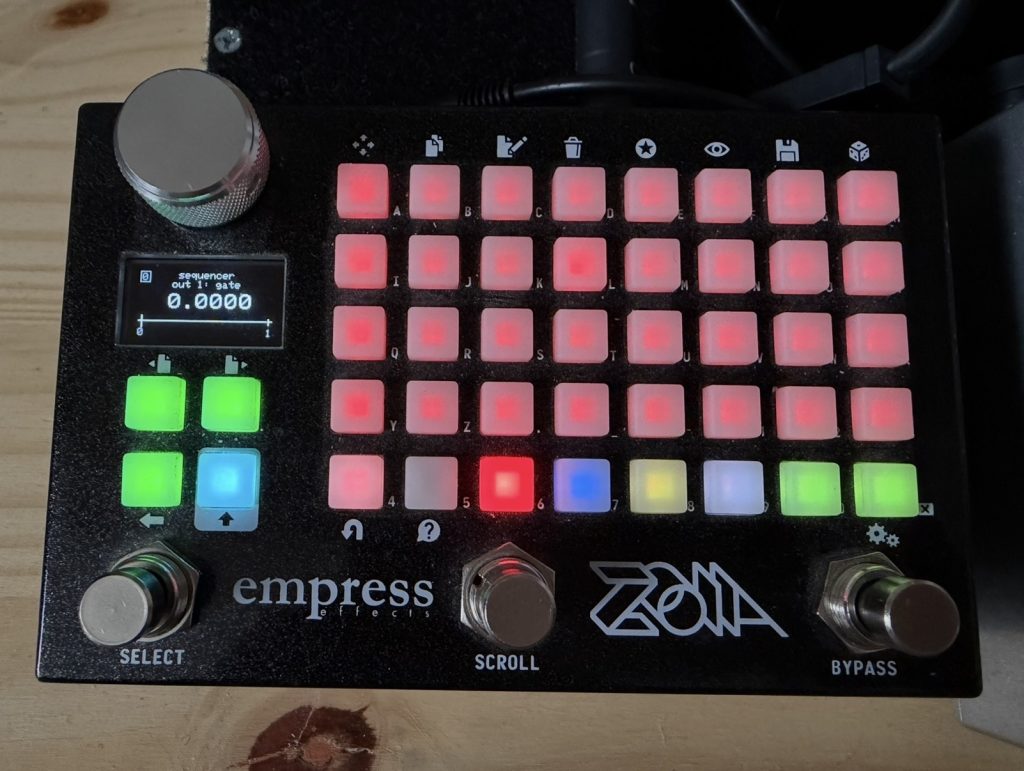
This is a drum synth engine with a sequencer and a sampler to record the output. I uploaded the original Z-DRUM patch a few years ago, but since this versions sound design features are slightly stripped down to make room for the sampler, it didn’t feel right to replace the original file due to the differences. The changes were inspired by my new 4-Track Recorder patch for the purpose of making drum tracks that can be imported into the 4-Track patch.
Page 1 is the first page of the sequencer, and page 2 is the second page, allowing for 64 steps.
Red – Kick
Blue – Snare
Yellow – HH
White – micro-timing
Lime – 2 automation tracks (more on micro-timing and automation later).
On the bottom left corner of each page there are pink indicator lights to show you which page you’re editing.
_____________________________________________________
Page 3 CTRL has misc controls.
Top left 3 buttons are toggle buttons that will mute the kick, snare, or hh.
Below that there are 3 trigger buttons that will trigger the kick, snare, and hh independent of the sequencer.
The bottom left buttons allow you to isolate the sequence to Page 1 only, Page 2 only, or the pink button makes both pages play in order.
The white and lime rows of radio buttons on the right set the destinations for the micro-timing and automation tracks. Each of the tracks can have only one destination (kick, snare, hh) or be set to the OFF position.
On the bottom right there are controls for BPM, using and external midi clock, and master volume.
_____________________________________________________
On the Parameters page the kick, snare, and hh sounds are very tweakable. On the top right corner there are 2 lime value modules that receive the CV values from the 2 sequencer tracks at their inputs. If you connect the outputs of those value modules to any of the sound design parameters on this page the automation tracks will now control the values of those parameters. All the values on the automation tracks default to the middle A5, which is a neutral starting point. Lowering the values of each step will send a negative value, raising the value will send a positive value.
When a micro-timing destination on the CTRL page is set to one of the 3 drum sounds, shifting the step values to the right on the sequencer will shift the timing of those particular steps.
_____________________________________________________
On the Sampler page there is a sampler module that is receiving the output of the 3 drum sounds.
First, you’ll need to assign a file to the sampler. Either create a new file, or select an existing one. There is a red toggle pushbutton for recording. Pressing the button starts recording, pressing it again stops recording.
Press record, then press the left stompswitch to begin playback of the drum sequence. When you are satisfied, press the left stompswitch again to stop playback, and hit the record button again to stop recording.
I’ve included an old video demonstration of the original Z-Drum patch. Most of the patch is the same, but there are minor differences with the sound design parameters.

Very nice! Super impressive!