
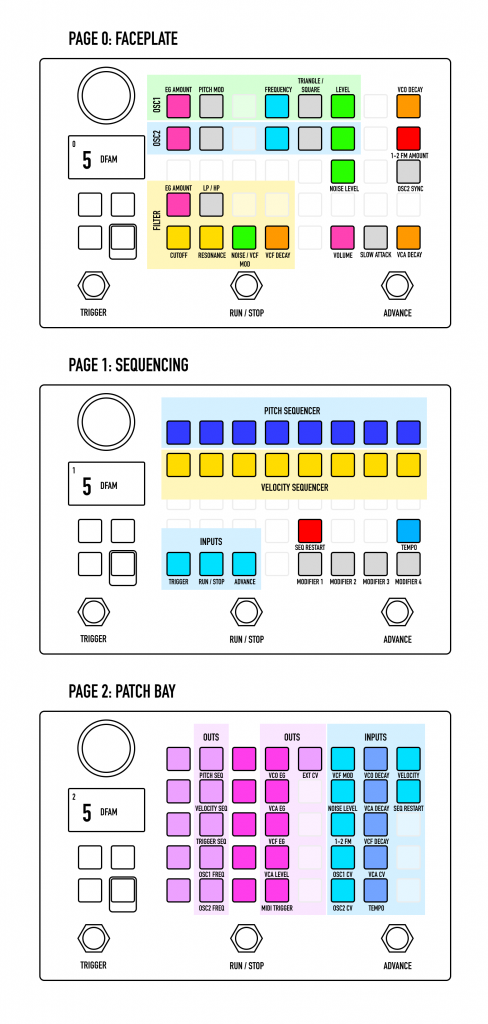
Moog DFAM recreated for Zoia.
Check the real DFAM manual/videos to better understand the concept. All examples in DFAM manual that don’t rely on filter self-oscillation should work on Zoia.
Update 1.4
– Patch optimizations allowed to free up additional 5% CPU
– Velocity Sequencer now shows playhead when playing
– Sequence Modifiers: create pattern variations and longer sequences by triggering restarts at different points of the pattern. Allows to step out of techno territory into breaks, hip-hop and jungle.
Update 1.3
– MIDI Autodetect. MIDI on-off button removed. As soon as Zoia senses MIDI clock input and MIDI start trigger it will automatically switch to MIDI clock and start sequencers from step 1. Pressing Stop on MIDI broadcasting device will instantly switch to internal clock and Run/Stop control.
– “Clock out” in patch bay had been replaced with “MIDI Trigger”. It will listen to notes sent on channel 16 and interpret them as triggers. Use to add elements to sequences using external sequencers or restart the sequencers before they reach step 8.
– “Sequence Restart” input added to Patch Bay. Great way to make shorter sequences or send MIDI gates from a longer sequences to make broken beats by restarting the sequence at arbitrary steps.
Update 1.21
– Filter declick fix (filter envelope had clicks on attack stage when slow VCA attack was on)
– Filter Decay patchbay fix
Update 1.2
– Filter modulation bug fixed
– OSC/Noise level controls are now linear, not exponential, much easier to use
– External CV input added
– Sequencer restart button added. Useful to align patterns when playing synced to midi
– Performance optimizations (slightly better CPU performance while the patch grew from 122 to 135 modules to accommodate fixes and new functionality)
Update 1.1
– Euroburo compatibility: sequencing page now contains Trigger, Run/Stop and Advance CV inputs on the bottom left. Map to buttons of your choice. Run/Stop should use a latching switch to work properly.
– Velocity input added to patch bay.
– Midi Run/Stop implemented. Works when Midi sync mode is activated.
Differences with the real DFAM:
– VCO Sync replaced with Bit Modulator as there’s no phase reset for oscillators on Zoia yet. The effect is similar sounding.
– Added midi sync and sequencer restart button.
Sequence Modifiers and Midi Autodetect Demo (Update 1.4)
Demo:
Tutorial (v 1.0):

This is amazing dude!! One of the best patches for the Zoia, hands down. And you keep working on it too!
Thank you so much for your contributions to this musical community 🙏
Really nice patch!
But I have a problem, on page 2 (sequencing) I cant get the sequencer to start when I push the ‘Run/Stop’ button? It just scrolls to the next patch?
Lasse, you need to turn on Auxillary mode. Press and hold middle and rightmost switch at the same time.
Can you explain a little more about “triggering restarts at different points of the pattern?” This sounds like it will take the instrument to another level. How do you do this, and how does it work?
Shame we can’t see the screen on the jam video. Aside from this detail, astounding work Sir!! I actually always wanted to jam with 2 Dfams but only had one, so that’s pretty awesome!!
Having the same problem as Lasse, except I did put on the Aux mode. None of the buttons work…seems to be only on this patch. Any ideas?
That’s amazing! I’m thinking buying a DFAM later and this is great to try it out.
Correct me if I’m wrong, if you patch the sequencer output (pitch or velocity) in the DFAM, then the original connection to pitch is removed, while in your patch it stays?
I have a suggestion, but maybe I don’t understand the patch correctly yet:
I notice you linked the sequencers outputs (hidden behind pixels) to the 2 VCOs. Instead, why not link it to the pitch and velocity to the patch bay only (as already done). From there you can add a VCO input (×2) in the patch bay. This would allow to visualize the original connection and remove them easily if needed (effectively making it more flexible than the DFAM).
(I will probably edit the patch this way, I can share it if you want. I’m thinking also upgrading the sequencer to 16 steps if the CPU allows it, removing the modifiers)
Thanks for that amazing patch!
How difficult would it be to add MIDI IN to this a la PlayDFAM or MAFD (MIDI Adapter for DFAM)?
Thank you for this, so much fun to jam on. Your documentation made it easy to get rolling on the Eurobureau.