
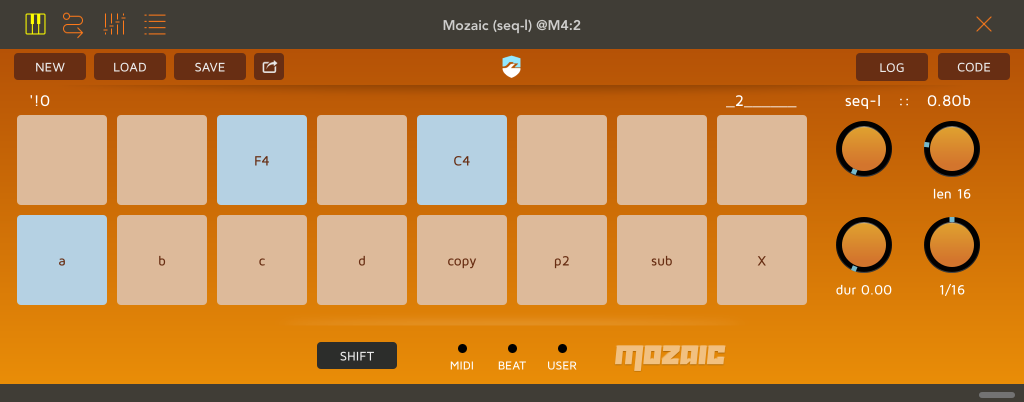
seq-l is a simple live looping midi note sequencer.
– midi input is recorded in a fixed length, syncronized looping note sequence. sequences can have up to 64 notes. the top row of pads shows the current 8 sequence steps while playing.
– input replaces existing notes in ‘sub’ mode, adds to them in ‘add’ mode, or can be disabled while playing the loop in ‘play’ mode.
– the ‘X’ pad deletes notes while held down. when the host is stopped, hold ‘X’ and play a midi note that will then control ‘X’. hold ‘X’ and tap the same note again to undo.
– ‘copy’ copies the current sequence to the next one selected.
– ‘p2’ shows a 2nd set of knob controls for swing, repeats and velocity fades.
– the ‘a’ – ‘d’ pads select one of 4 sequences. tap a pad to switch to the sequence. tap again while the host is stopped to show the next page of 8 steps. hold ‘a’ – ‘d’ and play a midi note which then will select the sequence.
– hold the shift button to reveal midi note triggers.
– ‘len’ sets the number of steps in all sequences, *only when the shift button is down*. this clears all sequences.
– ‘1/N’ sets the step size.
– ‘dur’ sets a duration for new notes in quarter notes. if ‘dur’ is zero new notes have the played duration.
– ‘swing’ delays even numbered steps by a percent of the time to the next step.
– ‘repeats’ sets a limit on how many times a note is played before deletion. it takes effect when notes are input. if ‘repeats’ is zero notes repeat indefinitely.
– ‘dv’ sets a velocity delta, which is subtracted from played notes so they gradually fade away. notes are deleted when velocity becomes zero or less.
– hold shift to show alternate pad controls. ‘copy!!’ copies the current sequence to all others. ‘reset’ sets default control values. ‘X!!’ clears the current sequence.
feedback welcome. /dan

Hi,
Your script has real potential. It would be nice if one could set the midi channel per sequence and if the sequences A – D could play simultaneously.