
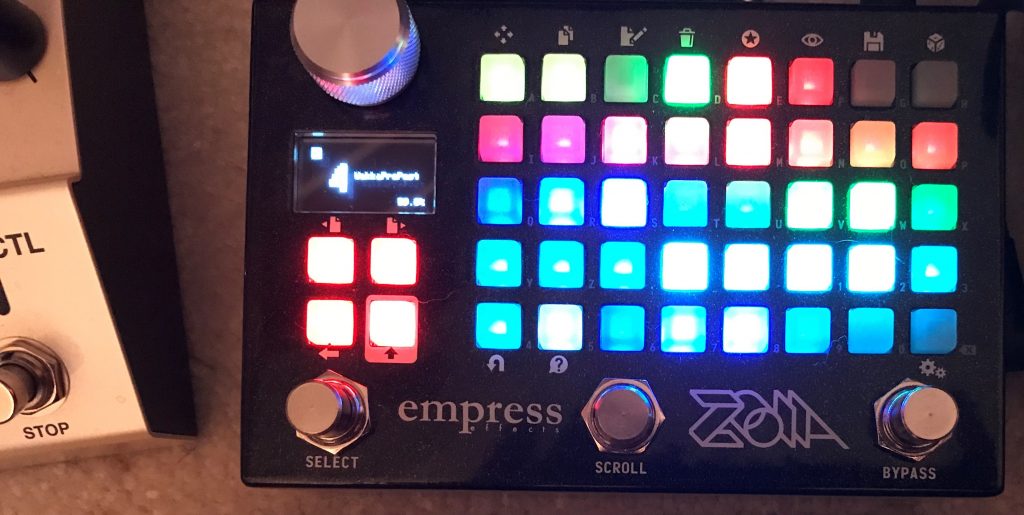
With all the CBA controller patches being uploaded, I thought I’d share my own. I only own one Chase Bliss pedal: Brothers. This started as a simple implementation of something like the CBA Faves pedal (I may upload v. 1.0–light on CPU, and simple) if there is interest.
This one is a CPU hog. Sometimes it behaves. Sometimes it doesn’t. I’d love for someone to improve it.
Basically it is a MIDI interface for Brothers, allowing for saving/switching between 16 presets (4 banks of 4), plus the “live mode” (all knobs as seen on pedal), as well as an expression pedal interface for all 6 knobs on the front of Brothers.
There are 2 main interface pages:
FRONT END P (Page 0):
Each of the 16 buttons can be pressed while holding down both Brothers footswitches to save a preset (buttons are labeled with the preset that will be saved to Brothers. This also goes for presets 1 and 2 which can be accessed directly from the front of the Brothers pedal, so be careful where you save!
Pressing a button after saving a patch recalls that patch and colors that button in that row. You can also scroll through all the presets using the left and middle stomp switches (see below)–the green indicator to the right of the grid shows which row you are currently scrolling through using the stomp switches.
The white button at the bottom of the page will brighten when pressing the left stomp, but can also be pressed to directly select “live mode” on the Brothers
The 3×2 grid of yellow buttons individually activate expression pedal control for each of the 6 knobs on brothers (all named correspondingly). If no yellow buttons are lit, the EXP will not affect the Brothers
FRONT END E (Page 1):
Each 2×2 colored block is intended to be a HI and LO range control for the expression pedal controlling the labeled knob for the Brothers–I’m not sure it actually works this way. I think that the way Brothers implements MIDI CC, it may only allow control up to the setting of the knob (need more testing to confirm). Regardless, you can use the purple buttons (they’re labeled as to what control they are) to monitor how the HI/LO controls affect the range of the cc corresponding to full expression pedal sweep. This is not an exact science–just play with it.
The corresponding colored “hanging chad” button adjacent to each 2×2 block (above or below) can be pressed to reverse/invert the toe down motion, i.e. when lit, sweeping from heel down to toe down with decrease the MIDI CC value.
AUDIO PATH (Page 2):
The only reason I mention this page is that you can adjust the noise gate parameters here.
CONTROLS:
Left stomp switch: Cycles through the 4 patches in the row indicated by the green light to the right continuously, unless you change rows. You can also LONG PRESS the left stomp switch to immediately switch to “live mode.”
Middle stomp switch: Cycles through the rows. Once in a new row, its 4 presets can be cycled through using the left stomp switch.
Right stomp switch: Engages the noise gate (toggle).
OTHER:
This expression pedal system is the biggest CPU hog here. Since it is over 100% CPU, sometimes the sound quality is affected–with the exception of the noise gate, this patch can be used without engaging the audio signal path. I may do a stripped down version of this in the future. I made this just to prove to myself I could do it.
Sometimes when mixing pressing preset buttons and cycling with the stomp switches the button presses will not select the correct patch if this happens, go to each RADIOBANK page and cycle through the switches while pressing the preset selection buttons. They will sync up eventually (or just switch to a new patch and back again).
If someone wants to improve this please do.
