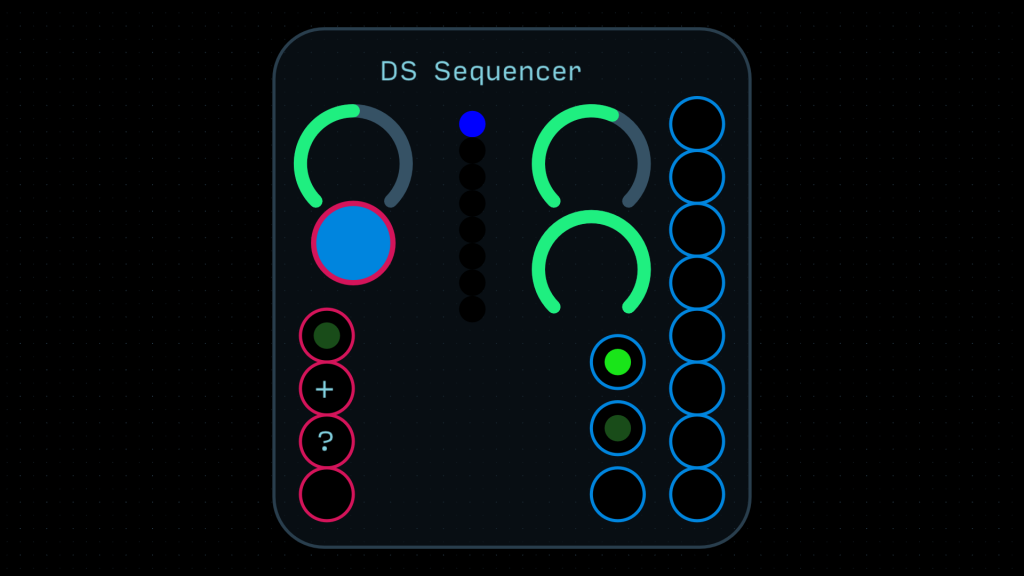
The DS Sequencer allows you to create melodies and modulations. Instead of being driven by a clock, it is driven by an LFO at the lower left unlabelled input.
An LFO value of 0 is the beginning of step 1, and a value of 1 is the end of step 8.
The top left knob sets the step value and the button under it “prints” the selected value to that step.
The top right knob is the step selector. When the knob is moved, a red current step indicator will appear. After a few moments of no change, the light will disappear.
The bottom right knob controls the maximum number of steps. The lights at the center of the module disappear as the max step length decreases.
Below this knob are two DGS outputs. The output between the DGS output and the DS output is a DGS output that will pulse when the value from one step to another is different. You can use this as a gate trigger. An inverted output is provided above it (the one that is normally on).
Below these DGS outputs is the main DS Sequencer output – 8 sequential values between 0 and 1 driven by the LFO input.
The column of 8 outputs are the values of the 8 individual steps. Step 1 is on the top; Step 8 is on the bottom.
The top three inputs on the right of the module are there for remote control.
The DGS input prints the value (like the button above it).
The + input is the step level (like the top left knob). It accepts a DS signal.
The ? input is the step selector level (like the top right knob). It also accepts a DS signal.