A metronome for better practice.
Timer, Tempo Sprints, Tempo Steps, Tap Tempo, Time/Beat Based
I spend a lot of time practicing, and over the years I found myself missing a metronome that really supports the way I work.
—
Features:
– Timer: The timer can stop the metronome after a defined interval.
– Tempo Sprints: The metronome can increase the tempo automatically over time. You define a starting tempo and the size of the tempo steps.
– Tempo Steps: Tempo can be in stepped scaling like on traditional mechanical metronomes.
– Tap Tempo: Tap the desired tempo directly.
– Adjustable Click Sounds
– The timer can operate in seconds/minutes or beats/bars
– Clear Read-Outs for tempo and remaining time
—
Parameters:
Pads:
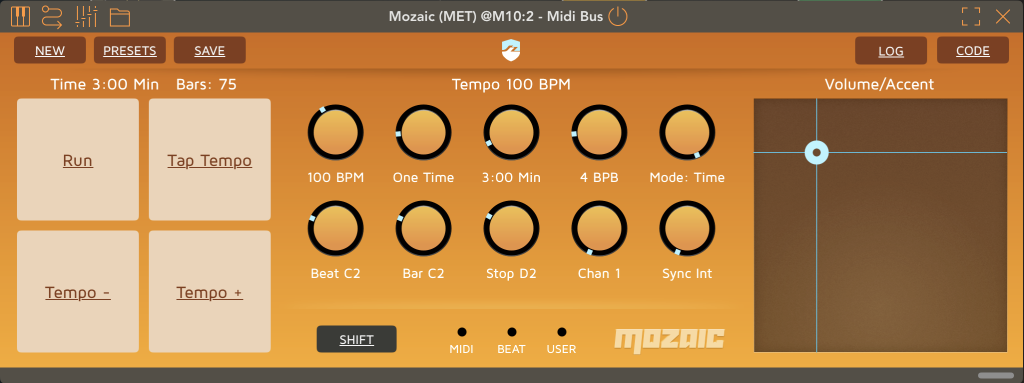
– Run — Starts or stops the metronome
– Tap Tempo — Sets the tempo by tapping
– Tempo− — Decreases the tempo by one step
– Tempo+ — Increases the tempo by one step
Knobs:
(from top left to bottom right)
– Tempo: 30–240 BPM in stepped scaling. For continuous setting press the Shift button while cranking the knob.
– Timer Modes
– Infinite — Runs continuously until stopped
– One Time — Stops after one timer cycle
– Accel 1–4 — Increases the tempo by 1–4 steps after each timer cycle
– Timer Duration: Length of the timer cycle
– Counting Mode: if the Timer Duration is displayed in seconds/minutes or beats/bar
– BPB (Beats per Bar): Defines after how many beats the bar accent is played.
– Beat / Bar / Stop: MIDI notes used for the three click signals. When the Shift is pressed while cranking the knob the notes will be audible and are displayed in a finer resolution.
– Chan: MIDI channel used for transmitting the click notes
– Sync: Internal/Host
XY Pad:
– Y Axis: Controls click volume via MIDI velocity.
– X Axis: Controls the accent strength of bar clicks relative to normal beats.
—
Setup in AUM
Click Sounds:
To produce sound, the metronome must be connected to an instrument — preferably one that generates short percussive sounds, such as a drum machine. The transmitted MIDI notes and channel can be configured directly in the metronome.
Host Sync:
To allow the metronome to control the host tempo, create the following mappings in:
AUM → MIDI CTRL → Transport
– CC 103 (Channel 16) — Tap Tempo
– CC 127 (Channel 16) — Tempo Changes
Also make sure the Mozaic instance is routed to the target MIDI Control destination in AUM.