
👁 EYESY Report Console: Enhanced Connectivity for Seamless Monitoring 🔍
We here at turbulent resonant colon are excited to announce a significant update to the EYESY Report Console, making it even easier to connect and monitor your EYESY device from any local network. This web-based tool now boasts enhanced flexibility, ensuring you always have real-time access to your EYESY’s vital system logs.
What’s New?
👁🔍
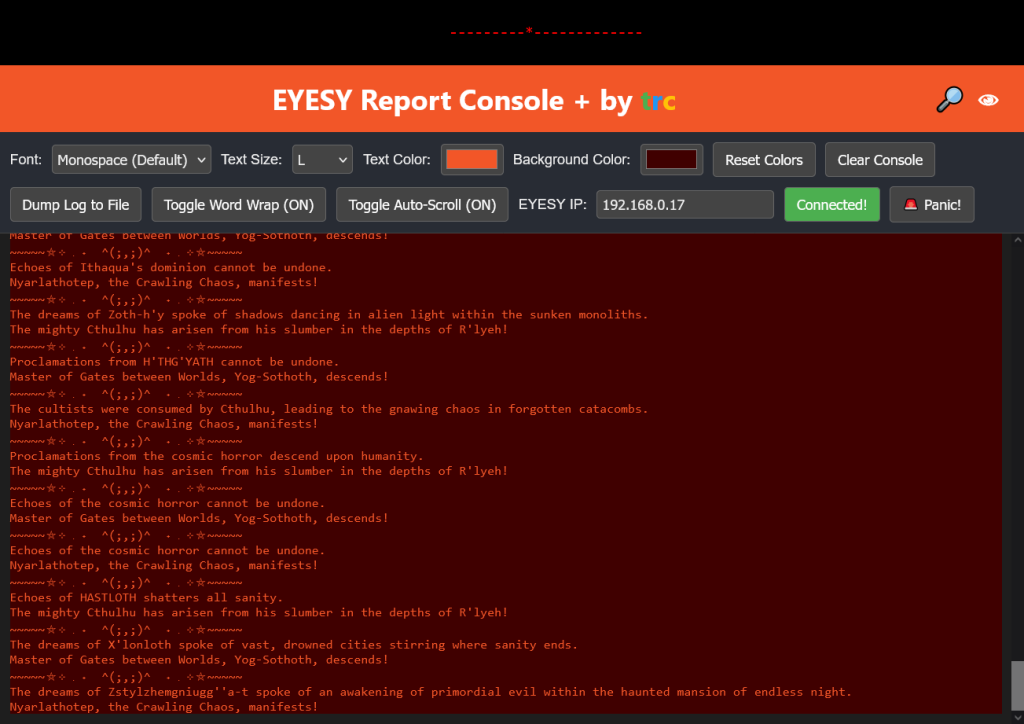
The biggest enhancement comes in how you connect to your EYESY. Gone is that pesky editing window. This is just the console window removed from the rest of the Eyesy’s onboard web editor feature and given some visual improvements. The console now features:
👁🔍
Smart IP Management: Upon loading, the console automatically attempts to connect using your last successfully connected IP address. If it’s your first time, or if the IP has changed, it defaults to a common EYESY address to get you started.
User-Friendly IP Input: A dedicated “EYESY IP” field in the control panel allows you to easily enter your device’s current IP address. Just type it in and hit “Connect.”
Persistent Connection: Once you successfully connect, the console remembers that IP address for future sessions in your browser. This means fewer manual inputs and more time focusing on your EYESY.
Clear Connection Status: The “Connect” button provides visual feedback, turning green when connected and red if disconnected, giving you an immediate understanding of your connection status.
👁🔍
Core Features You Still Love:
👁🔍
Alongside these connectivity improvements, the EYESY Report Console retains all the powerful features you rely on for insightful monitoring:
👁🔍
Dynamic Visuals: A retro “Knight Rider” style scanner adds a cool, functional aesthetic.
Customizable Display: Personalize your viewing experience by adjusting fonts, text size, and color themes. Easily reset everything to default with a click.
Efficient Log Management: Take control with options to clear the console, toggle word wrap for readability, and pause/resume auto-scrolling when you need to review specific messages.
Intelligent Log Highlighting: Important messages are still automatically color-coded for quick identification: errors in red, warnings in gold, information in light blue, success in green, and debug messages in light steel blue. Critical “AttributeError” messages will even blink red to grab your immediate attention.
👁🔍
Accessing Your EYESY Data:
The EYESY Report Console connects seamlessly to your device via a WebSocket, ensuring a smooth, real-time stream of information. With its enhanced IP management, getting connected has never been easier, allowing you to monitor and troubleshoot your EYESY with confidence, no matter the network.
👁🔍
We believe these updates will significantly improve your experience with the EYESY Report Console. Dive in and enjoy a more flexible and intelligent way to interact with your EYESY!
👁🔍
Update notes for v1.1:
Added dropdown toolbar to minimize how much precious report console real estate was being taken up.
👁🔍
All errors should be flagged in red now. Sometimes blinking! Critical errors (messages starting with “error with draw:”, containing “AttributeError”, or containing “ERROR” in all caps) that are red, glowing, and blinking.
General errors (any message containing “error” case-insensitively) that are red and glowing (but NOT blinking).
Other log levels (WARNING, INFO, SUCCESS, DEBUG) with their respective highlighting.
👁🔍
V 1.2 Update notes: Added text search and text file dump options
👁🔍
V 1.3 Update adds some overflow protection under the hood to hopefully make it not freak out after too much text
👁🔍
V 1.4 Adds a PANIC! button that you can hit to immediately search for and isolate text in the logs with terms like “WARNING, ERROR, errors” and can be customized to suit your needs. Also fixed an unintended extra linebreak inserted into the log display
